
Printing guide
How to print a Santa letter (A4, US Letter and phone PDF)
Our letters, certificates, envelopes and clue cards are made for home printers. Most printing problems come from two settings: the paper size and the scale. Here's what to pick, what we saw when we tested it, and how to keep a PDF on your phone.
Updated October 11, 2026
Step by step
1.Pick your paper size before you print
In the letter maker, choose US Letter (8.5 × 11 in, usual in the US and Canada) or A4 (210 × 297 mm, usual almost everywhere else). For a purchased pack, open the editor from My orders, pick the size and save; the treasure hunt pages use the same setting. The print page then says which size it made, for example “1 page · US Letter”.
2.Open the print page
Press Print / Save as PDF. For a free letter it opens from the letter maker; for a Family Pack or Treasure Hunt Bundle, open it from My orders so the pages print without a watermark.
3.Match the paper and keep the scale at 100%
In the print dialog, set the paper size to the same size you picked, Scale to 100% (or Actual size), and leave Margins on Default. Every page already has a safe margin of about 15 mm, so nothing important sits near the edge.
4.Decide on background graphics
Turn Background graphics (Chrome, Edge) or Print backgrounds (Safari, Firefox) on for the cream or tinted paper look. Leave it off to save ink: the page prints on white, and the borders, postmark and ornaments still print.
5.Print, or save a PDF to print later
Choose your printer, or choose Save as PDF as the destination to keep a file. One letter is one page; a Family Pack prints a letter, a certificate and an envelope for each child.
6.On a phone, save the PDF from the print screen
iPhone or iPad (Safari): tap Print / Save as PDF, then tap the Share button at the top of the print options and choose Save to Files. Android (Chrome): tap Print / Save as PDF, choose Save as PDF as the printer at the top, then tap the PDF button.
What we saw when we tested it
On October 11, 2026 we printed a Family Pack sample (Candy Cane Post theme) to PDF with desktop Chrome, using each setting below, and compared the pages. This was a PDF check, not a test on every printer model — if your printer does something odd, the troubleshooting list below covers the common causes.
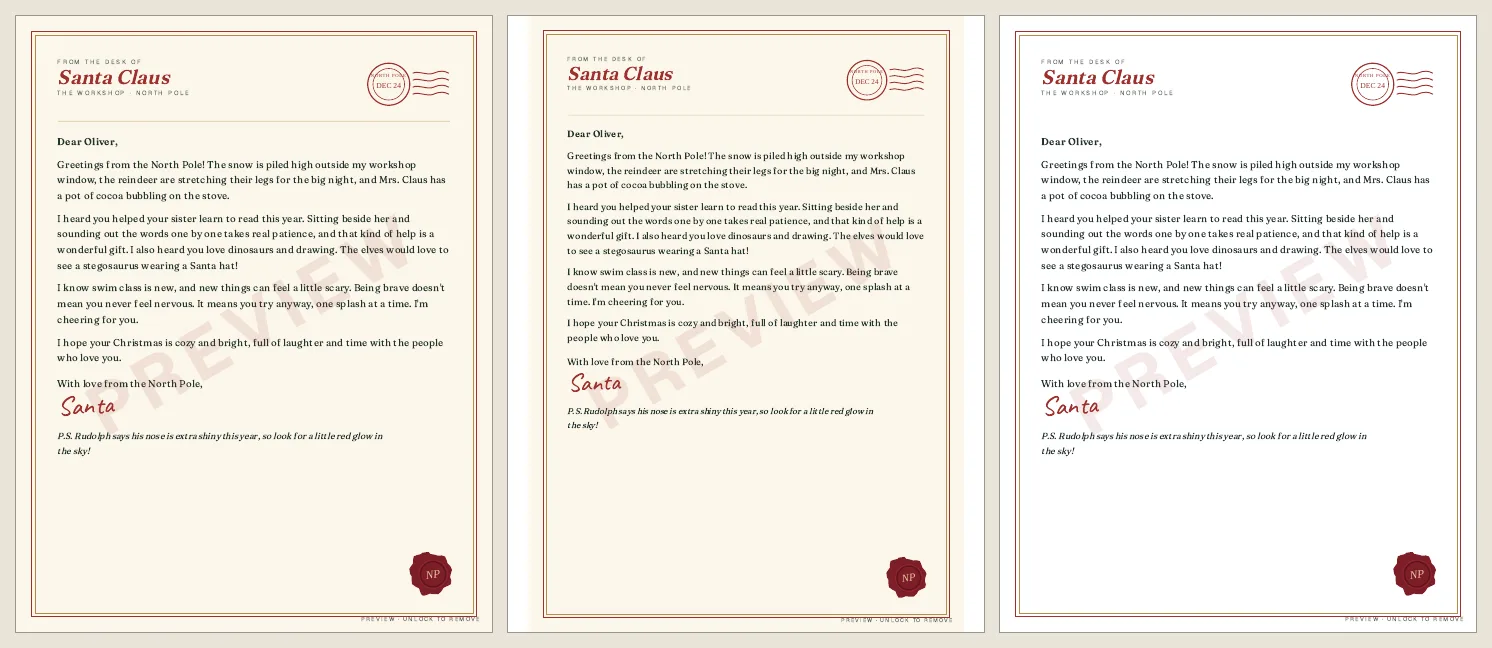
The other way round — a US Letter page on A4 paper — fits, with a blank strip at the bottom.
Troubleshooting
- The bottom border is cut off
- The paper in the print dialog is smaller than the page you made — usually an A4 page printed on US Letter. Switch the paper size in the letter maker (or in the dialog), or as a last resort choose “Fit to page”.
- There's a white strip at the bottom
- A US Letter page printed on A4 paper. It's harmless; for a perfect fit pick A4 in the letter maker.
- The paper came out white, not cream
- Background graphics is off. That's fine for saving ink — turn it on if you want the tinted paper.
- The letter says “sample” or “preview” across it
- Previews of Family Pack themes are watermarked until you buy. Purchased packs print clean from My orders; the free Simple Christmas letter always prints without a watermark.
- Everything looks tiny or huge
- Set Scale back to 100% / Actual size. “Fit to page” or a custom scale shrinks the margins we built in.
Envelopes, certificates and clue cards
- Envelope: cut along the solid line, fold the dashed lines inward (sides first, then the bottom), add a little glue or tape, slip in the folded letter and fold the top flap down.
- Certificate: plain printer paper works. If your printer takes thicker paper or card, it makes a sturdier keepsake.
- Treasure hunt: the 8 kids' clue cards print 4 to a page with dashed cut lines; print the parent setup sheet separately and keep it out of sight. See the treasure hunt setup guide.
Still stuck? Email us from the Contact page and tell us your device, browser and paper size.